Change queue access

Enter password

Enter the password to open the change queue and review drafts.

V20260505.1901
Stage deploy healthy · Updated May 5, 3:01 PM

Viewing the current page. Start typing in the proposed side to make changes.

Current: Using Time Budgets

Administrative Portal > Work > Jobs > Editing Jobs > Using Time Budgets

In order to begin using this feature you must first navigate to the top menu where it says “Admin” —> “Settings” —> “General Settings” —> Make sure the box next to “Track Budgeted Time Overage” is checked.

Now, you can use this feature inside each job you create as you wish. Using Time Budgets allows you to track the hours worked vs the hours budgeted for a job.

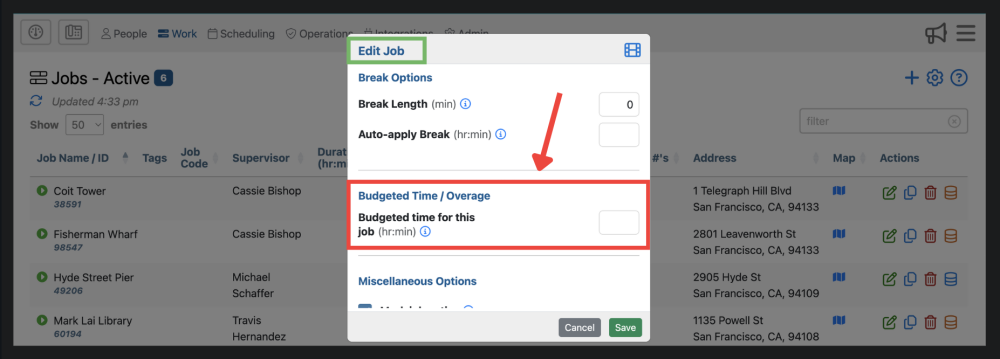
When utilizing the Time Budget, you are able to set an amount of time (e.g. 5 hours) to a job, and report on overages if they occur. In order to use time budgets, you must setup time budget information for each job using the Edit Job form.

Proposed: Using Time Budgets

Administrative Portal > Work > Jobs > Editing Jobs > Using Time Budgets

In order to begin using this feature you must first navigate to the top menu where it says “Admin” —> “Settings” —> “General Settings” —> Make sure the box next to “Track Budgeted Time Overage” is checked.

Now, you can use this feature inside each job you create as you wish. Using Time Budgets allows you to track the hours worked vs the hours budgeted for a job.

When utilizing the Time Budget, you are able to set an amount of time (e.g. 5 hours) to a job, and report on overages if they occur. In order to use time budgets, you must setup time budget information for each job using the Edit Job form.