Change queue access

Enter password

Enter the password to open the change queue and review drafts.

V20260505.1901
Stage deploy healthy · Updated May 5, 3:01 PM

Viewing the current page. Start typing in the proposed side to make changes.

Current: Viewing Bulletin Board

v000203/15/2026

Employee Instructions > Clock In By App > Viewing Bulletin Board

Employees can create postings on the bulletin board as a way to share an important message with subsequent employees who will work this job.

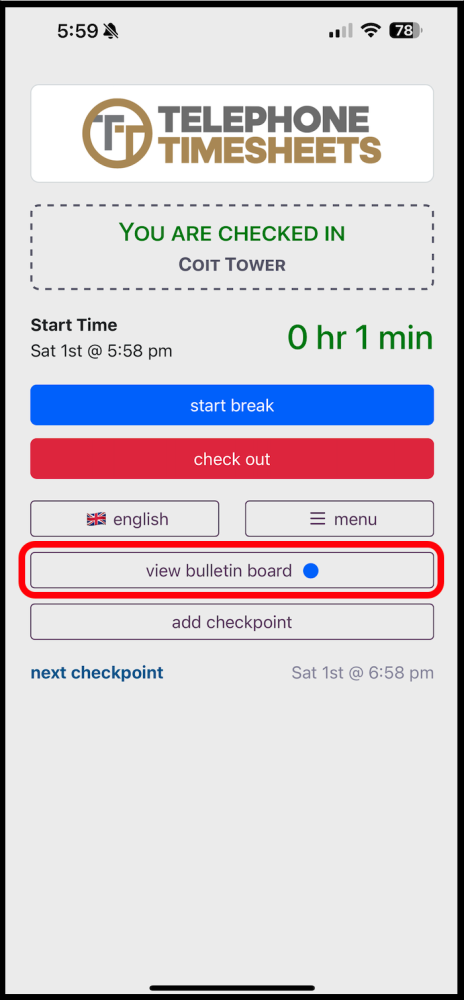
If there is a message posted to the bulleting board, employees who work this same job on a subsequent shift will be alerted by the blue dot on the View Bulletin Board button as shown below.
Note: Employees can submit new postings to the bulletin board while they are clocked in to a job. Admins can add to the bulletin board at any time by checking the “Add to bulletin board” checkbox in the shift report editor.

Proposed: Viewing Bulletin Board

v000203/14/2026

Employee Instructions > Clock In By App > Viewing Bulletin Board

Employees can create postings on the bulletin board as a way to share an important message with subsequent employees who will work this job.

If there is a message posted to the bulleting board, employees who work this same job on a subsequent shift will be alerted by the blue dot on the View Bulletin Board button as shown below.

Note: Employees can submit new postings to the bulletin board while they are clocked in to a job. Admins can add to the bulletin board at any time by checking the “Add to bulletin board” checkbox in the shift report editor.