Change queue access

Enter password

Enter the password to open the change queue and review drafts.

V20260505.1901
Stage deploy healthy · Updated May 5, 3:01 PM

Viewing the current page. Start typing in the proposed side to make changes.

Current: Repeating Checkpoints

Administrative Portal > Work > Tours > Adding a tour > Repeating Checkpoints

This will allow a supervisor to set a repeating checkpoint at any interval of their choosing. Meaning, if you want your employee to submit a checkpoint every hour after their shift start this can be done with this option. Additionally, the repeating checkpoints will start once an employee clocks in.

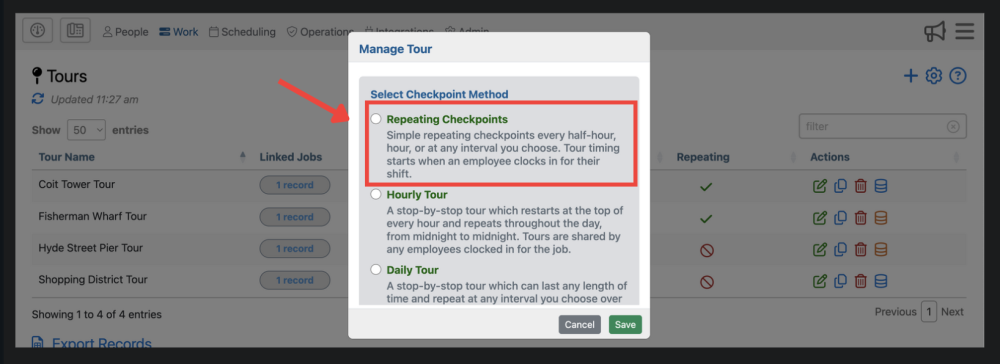
Select the “repeating checkpoint” option once you click the icon in the upper right corner of the tours page.

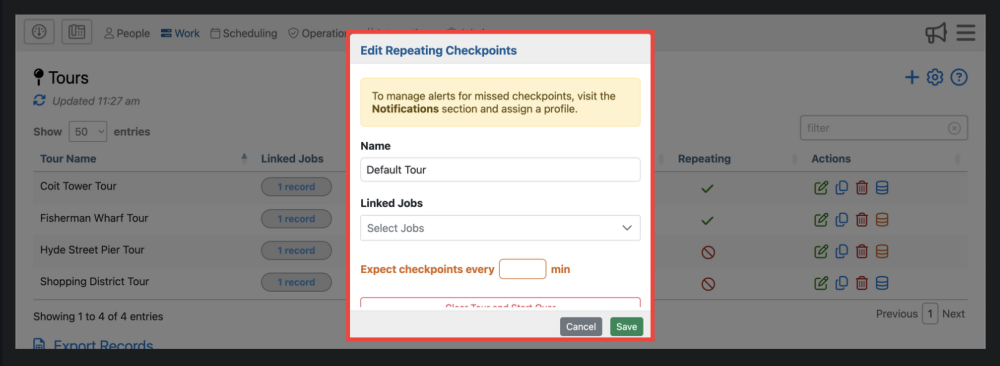
Once you’ve clicked “Repeating Checkpoint” you’ll then be brought to a form. Simply fill out the name of the tour, the job it applies to, and when to expect checkpoints.

Proposed: Repeating Checkpoints

Administrative Portal > Work > Tours > Adding a tour > Repeating Checkpoints

This will allow a supervisor to set a repeating checkpoint at any interval of their choosing. Meaning, if you want your employee to submit a checkpoint every hour after their shift start this can be done with this option. Additionally, the repeating checkpoints will start once an employee clocks in.

Select the “repeating checkpoint” option once you click the icon in the upper right corner of the tours page.

Once you’ve clicked “Repeating Checkpoint” you’ll then be brought to a form. Simply fill out the name of the tour, the job it applies to, and when to expect checkpoints.