Change queue access

Enter password

Enter the password to open the change queue and review drafts.

V20260505.1901
Stage deploy healthy · Updated May 5, 3:01 PM

Viewing the current page. Start typing in the proposed side to make changes.

Current: Change Password

Administrative Portal > Admin > Change Password

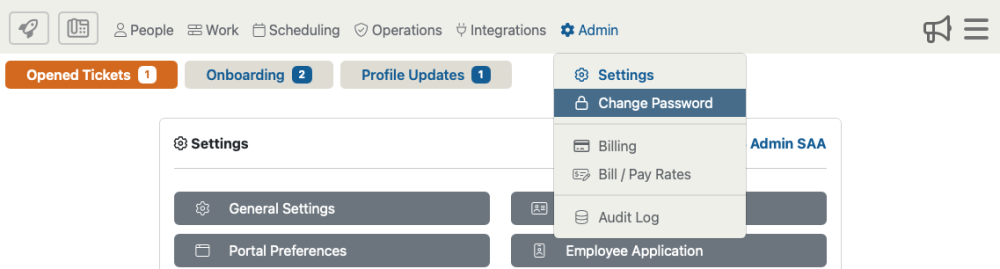
Accessing changing your password by selecting “Admin then, “Change Password” from the drop down menu.
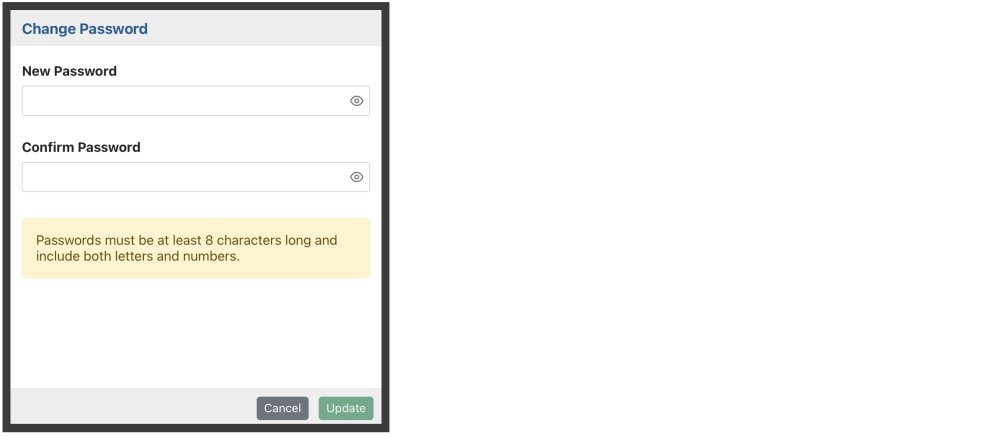
Here you are able to create a new password to access the admin portal. Your password must be at least 8 characters long and include both letters and numbers.
Proposed: Change Password

Administrative Portal > Admin > Change Password

Accessing changing your password by selecting “Admin then, “Change Password” from the drop down menu.

Here you are able to create a new password to access the admin portal. Your password must be at least 8 characters long and include both letters and numbers.