Change queue access

Enter password

Enter the password to open the change queue and review drafts.

V20260505.1901
Stage deploy healthy · Updated May 5, 3:01 PM

Viewing the current page. Start typing in the proposed side to make changes.

Current: Transferring Phone Numbers

Administrative Portal > People > Employees > Transferring Phone Numbers

Transferring is used when transferring a company owned mobile phone from one employee to another. Each employee must have a unique phone number, meaning 2 employees can’t share the same company mobile phone number. When transferring a phone number from one employee to another, the system will auto create a new unique mobile number for the employee the number was transferred from. To learn more about how Telephone Timesheets uses mobile numbers while clocking in/out, go to the Adding Employees section of the manual.

There are 2 ways to transfer a mobile number from one employee to another:

1. Create an employee and enter the desired phone number being transferred to the new employee in the Mobile Number section of the Add Employee form
e.g. Transferring my preexisting employees company mobile phone number (Bob Anderson) to my new employee (Sally Jones).

2. Edit a preexisting employee and enter the desired phone number being transferred from another preexisting employee in the Mobile Number section of the Edit Employee form
e.g. transferring my preexisting employees company mobile phone number (Bob Anderson) to another preexisting employee (Martin Smith).

You will be prompted to transfer the phone number.
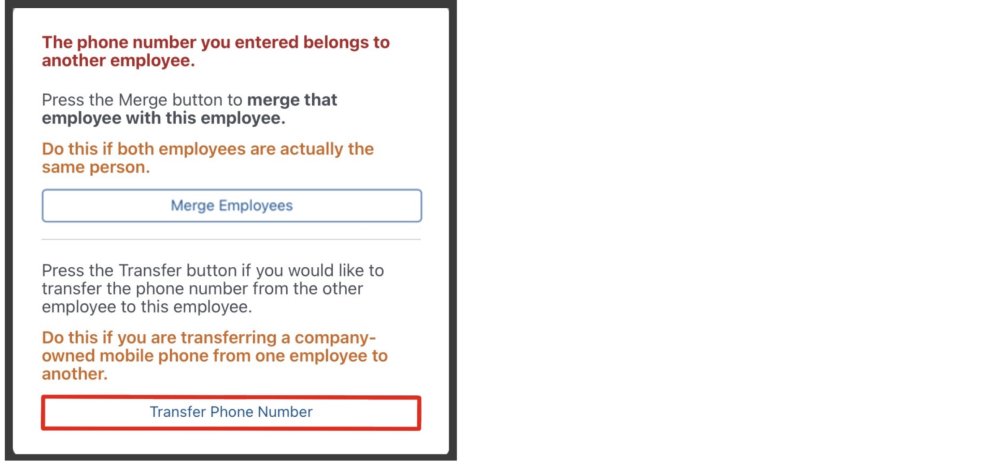
Notice, there is also the option to merge employees. To learn more about merging employees, go to the Merging Two Employee Records section of the manual.

Proposed: Transferring Phone Numbers

Administrative Portal > People > Employees > Transferring Phone Numbers

Transferring is used when transferring a company owned mobile phone from one employee to another. Each employee must have a unique phone number, meaning 2 employees can’t share the same company mobile phone number. When transferring a phone number from one employee to another, the system will auto create a new unique mobile number for the employee the number was transferred from. To learn more about how Telephone Timesheets uses mobile numbers while clocking in/out, go to the Adding Employees section of the manual.

There are 2 ways to transfer a mobile number from one employee to another:

1. Create an employee and enter the desired phone number being transferred to the new employee in the Mobile Number section of the Add Employee form
e.g. Transferring my preexisting employees company mobile phone number (Bob Anderson) to my new employee (Sally Jones).

2. Edit a preexisting employee and enter the desired phone number being transferred from another preexisting employee in the Mobile Number section of the Edit Employee form
e.g. transferring my preexisting employees company mobile phone number (Bob Anderson) to another preexisting employee (Martin Smith).

You will be prompted to transfer the phone number.

Notice, there is also the option to merge employees. To learn more about merging employees, go to the Merging Two Employee Records section of the manual.