Change queue access

Enter password

Enter the password to open the change queue and review drafts.

Stage deploy healthy ยท Updated

You can edit the proposed copy directly here. Approve And Publish will save and publish those edits.

Current: Deleting Announcements

v000106/08/2026

Administrative Portal > Operations > Announcements > Deleting Announcements

Deleting Announcements removes an announcement from the Announcements page. Use delete only when the announcement is no longer needed. If the announcement should be paused temporarily, consider editing its timing or active settings instead.

Start from Operations > Announcements. Choose the announcement category, find the announcement you want to remove, then click the red trash icon in that announcement's action area.
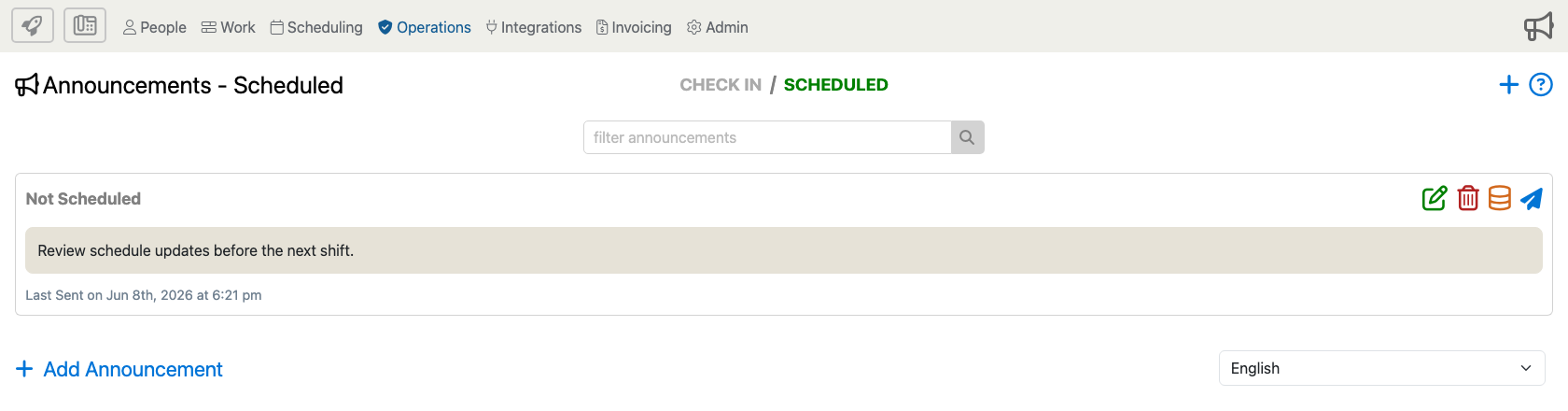
Announcements Scheduled page with the delete action highlighted for an existing scheduled announcement.

A confirmation window opens before the announcement is removed.
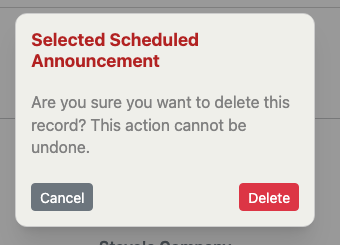
Delete confirmation window for a selected scheduled announcement.

Before You Delete

Make sure the announcement is no longer needed by employees or administrators. Deleting removes the record from the list, so it should not be used for announcements that only need to be changed, rescheduled, disabled, or kept for later reuse.

Confirm Or Cancel

Choose Delete only when you are sure the selected announcement should be removed. Choose Cancel to close the confirmation window without deleting anything.

Proposed: Deleting Announcements

v000106/08/2026

Administrative Portal > Operations > Announcements > Deleting Announcements

Deleting Announcements removes an announcement from the Announcements page. Use delete only when the announcement is no longer needed. If the announcement should be paused temporarily, consider editing its timing or active settings instead.

Start from Operations > Announcements. Choose the announcement category, find the announcement you want to remove, then click the red trash icon in that announcement's action area.

Announcements Scheduled page with the delete action highlighted for an existing scheduled announcement.

A confirmation window opens before the announcement is removed.

Delete confirmation window for a selected scheduled announcement.

Before You Delete

Make sure the announcement is no longer needed by employees or administrators. Deleting removes the record from the list, so it should not be used for announcements that only need to be changed, rescheduled, disabled, or kept for later reuse.

Confirm Or Cancel

Choose Delete only when you are sure the selected announcement should be removed. Choose Cancel to close the confirmation window without deleting anything.