Change queue access

Enter password

Enter the password to open the change queue and review drafts.

V20260505.1901
Stage deploy healthy · Updated May 5, 3:01 PM

Viewing the current page. Start typing in the proposed side to make changes.

Current: Shift-Time Tours

Administrative Portal > Work > Tours > Adding a tour > Shift-Time Tours

Shift-Time tours can be set throughout the period of your employee’s shift. Checkpoints will be set as normal and then a “rest period” will be assigned before repeating the tour.

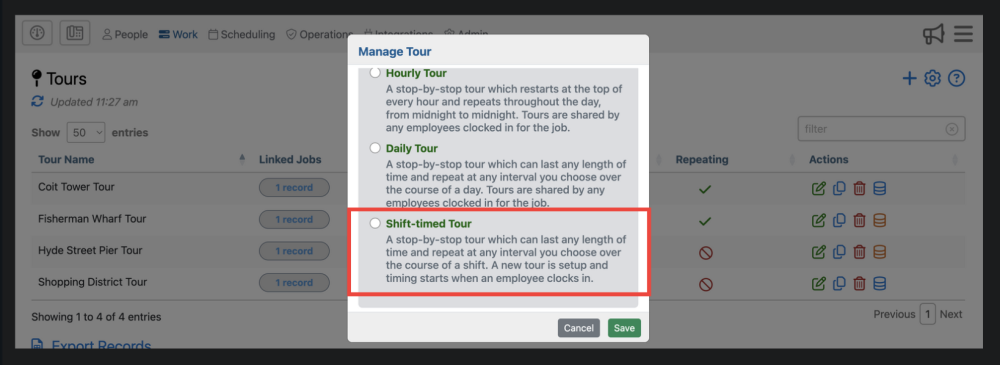
In order to get started, select the “Shift-Time Tours” option once you click the icon in the upper right corner of the tours page.

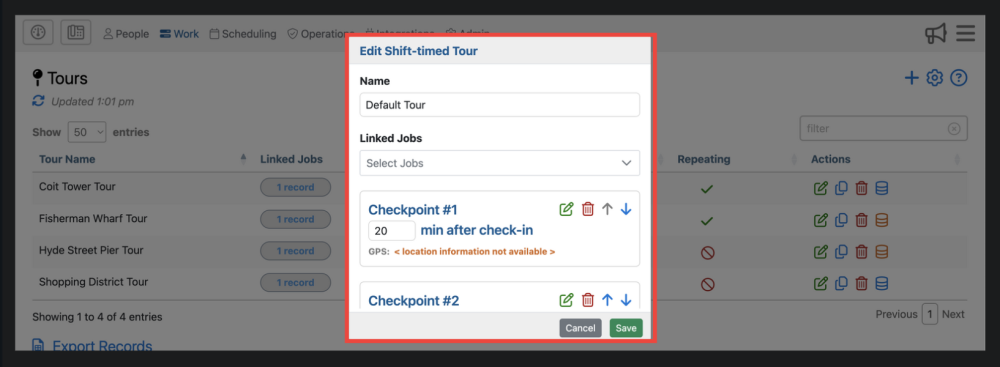
This will now open a form that is similar to the other tours.
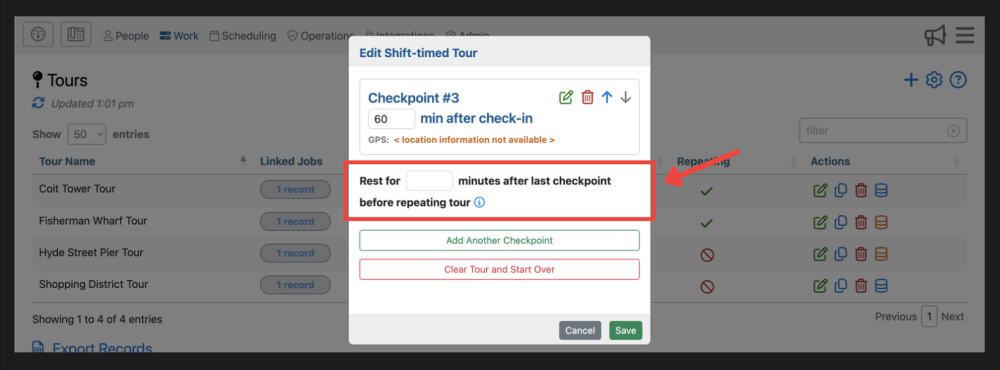
However, at the bottom of the checkpoint list, it gives supervisors an option to add in a rest duration before repeating the tour and the subsequent checkpoints.
Proposed: Shift-Time Tours

Administrative Portal > Work > Tours > Adding a tour > Shift-Time Tours

Shift-Time tours can be set throughout the period of your employee’s shift. Checkpoints will be set as normal and then a “rest period” will be assigned before repeating the tour.

In order to get started, select the “Shift-Time Tours” option once you click the icon in the upper right corner of the tours page.

This will now open a form that is similar to the other tours.

However, at the bottom of the checkpoint list, it gives supervisors an option to add in a rest duration before repeating the tour and the subsequent checkpoints.