Change queue access

Enter password

Enter the password to open the change queue and review drafts.

V20260505.1901
Stage deploy healthy · Updated May 5, 3:01 PM

Viewing the current page. Start typing in the proposed side to make changes.

Current: Enable Breaks By Calls & Texts

Administrative Portal > Work > Breaks > Enable Breaks By Calls & Texts

By default, the only way for an employee to initiate a break is through the employee web portal. If you would like to enable employees to start and end breaks through phone calls and text messages you can enable this feature by navigating to Admin —> Settings —> General Settings —> check the box labeled “Enable IVR and SMS breaks.”
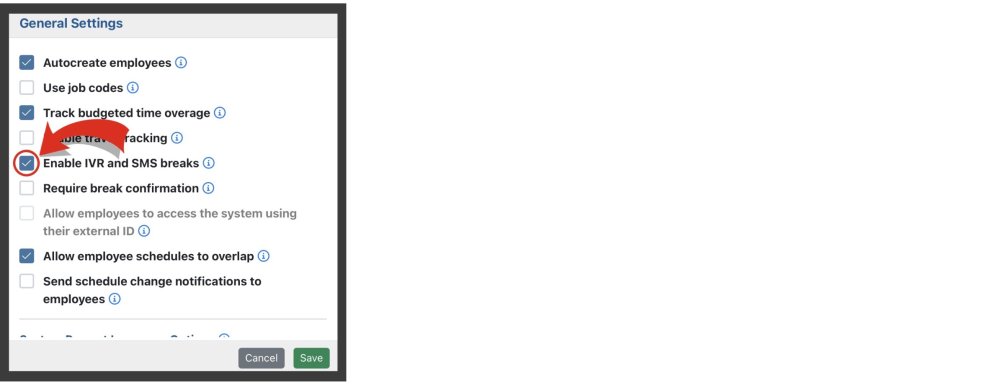
When enabled, employees will be able to initiate breaks by texting the letter “b” to your toll-free clock in number, or by calling the toll-free clock-in number and press 1 when prompted.

Proposed: Enable Breaks By Calls & Texts

Administrative Portal > Work > Breaks > Enable Breaks By Calls & Texts

By default, the only way for an employee to initiate a break is through the employee web portal. If you would like to enable employees to start and end breaks through phone calls and text messages you can enable this feature by navigating to Admin —> Settings —> General Settings —> check the box labeled “Enable IVR and SMS breaks.”

When enabled, employees will be able to initiate breaks by texting the letter “b” to your toll-free clock in number, or by calling the toll-free clock-in number and press 1 when prompted.