Change queue access

Enter password

Enter the password to open the change queue and review drafts.

V20260505.1901
Stage deploy healthy · Updated May 5, 3:01 PM

Viewing the current page. Start typing in the proposed side to make changes.

Current: Pausing & Disabling Notifications

Administrative Portal > Work > Notifications > Editing Notification Profiles > Pausing & Disabling Notifications

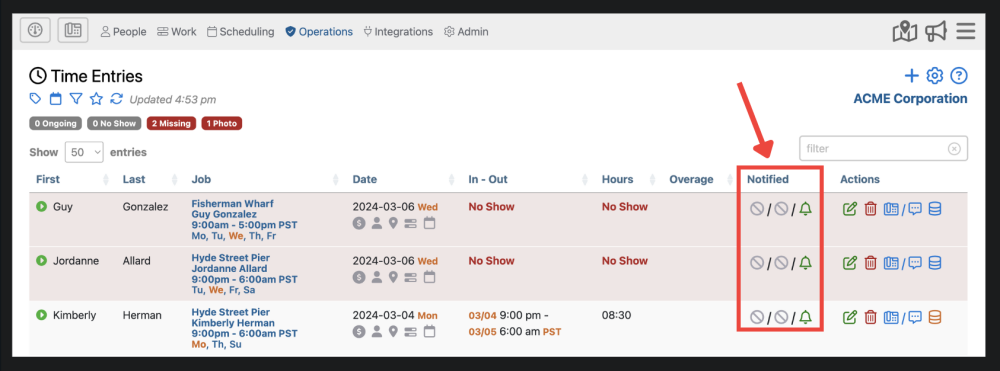
You can disable notifications or temporarily pause notifications for a particular job by selecting “Operations” then “Time Entries”

First, click the notification icon in the Notified column.
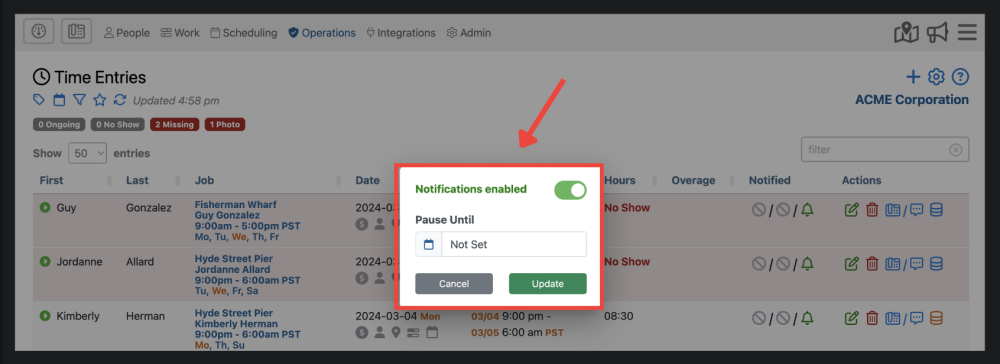
Now, you will able to enable/disable notifications for that particular job. You also have the option to pause notifications until a specific date. Notifications will automatically unpause on the day you select underneath “Pause Until”.
Notifications can be paused for one or more employees by scheduling time off. You can request time off by creating a Time Off entry in the Schedules section of the Admin Portal.

Proposed: Pausing & Disabling Notifications

Administrative Portal > Work > Notifications > Editing Notification Profiles > Pausing & Disabling Notifications

You can disable notifications or temporarily pause notifications for a particular job by selecting “Operations” then “Time Entries”

First, click the notification icon in the Notified column.

Now, you will able to enable/disable notifications for that particular job. You also have the option to pause notifications until a specific date. Notifications will automatically unpause on the day you select underneath “Pause Until”.

Notifications can be paused for one or more employees by scheduling time off. You can request time off by creating a Time Off entry in the Schedules section of the Admin Portal.