Change queue access

Enter password

Enter the password to open the change queue and review drafts.

Stage deploy healthy · Updated

You can edit the proposed copy directly here. Approve And Publish will save and publish those edits.

Current: SMS Opt-In Instructions

v000207/16/2026

Administrative Portal > Admin > Settings > Employee Application > SMS Opt-In Instructions

Telephone Timesheets SMS Opt-In

This page documents the public web-form opt-in used by the Telephone Timesheets worker application. SMS is optional and is not a condition of purchasing or using Telephone Timesheets. In this documentation, worker includes both employees and 1099 contractors.

How Workers Opt In

  1. Open the Telephone Timesheets worker application.
  2. Select a language and continue to Worker login.
  3. Enter a mobile telephone number.
  4. Review the complete SMS disclosure. The consent checkbox is blank by default.
  5. Check the consent box and select Text me a login code.

If the worker leaves the consent box unchecked, Telephone Timesheets does not send the login-code text. Each submitted request identifies the disclosure version and opt-in source.
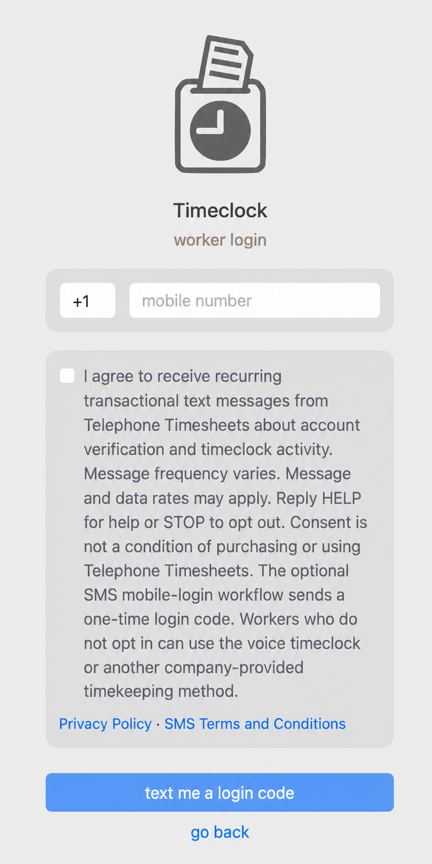
Telephone Timesheets worker login page showing the SMS consent checkbox blank by default, the complete disclosure, SMS Privacy Policy and SMS Terms links, and the Text me a login code button.

Disclosure Shown at the Point of Consent

I agree to receive recurring transactional text messages from Telephone Timesheets about account verification and timeclock activity. Message frequency varies. Message and data rates may apply. Reply HELP for help or STOP to opt out. Consent is not a condition of purchasing or using Telephone Timesheets. The optional SMS mobile-login workflow sends a one-time login code. Workers who do not opt in can use the voice timeclock or another company-provided timekeeping method.

The form displays direct links to the SMS Privacy Policy and SMS Terms and Conditions next to the consent control.

Initial Login-Code Message

After a worker checks the box and requests the optional SMS login, the first message follows this format:

Telephone Timesheets login code: 123456. Message frequency varies. Message and data rates may apply. Reply HELP for help or STOP to opt out.

Other Transactional Messages

Workers who opt in may also receive account-verification and timeclock messages such as clock-in or clock-out confirmations and alerts, secure GPS check-in links, schedule information, and timecard notifications. Message frequency varies based on the worker’s activity and the settings chosen by their company.

Non-SMS Alternatives

Workers are not required to opt in to SMS to use Telephone Timesheets. A worker who does not opt in can use the voice timeclock or another timekeeping method provided by the company.

Privacy and Program Terms

Text messaging originator opt-in data and consent are not shared with third parties. See the Telephone Timesheets SMS Privacy Policy and Telephone Timesheets SMS Terms and Conditions for full details.

Proposed: SMS Opt-In Instructions

v000207/16/2026

Administrative Portal > Admin > Settings > Employee Application > SMS Opt-In Instructions

Telephone Timesheets SMS Opt-In

This page documents the public web-form opt-in used by the Telephone Timesheets worker application. SMS is optional and is not a condition of purchasing or using Telephone Timesheets. In this documentation, worker includes both employees and 1099 contractors.

How Workers Opt In

  1. Open the Telephone Timesheets worker application.
  2. Select a language and continue to Worker login.
  3. Enter a mobile telephone number.
  4. Review the complete SMS disclosure. The consent checkbox is blank by default.
  5. Check the consent box and select Text me a login code.

If the worker leaves the consent box unchecked, Telephone Timesheets does not send the login-code text. Each submitted request identifies the disclosure version and opt-in source.

Telephone Timesheets worker login page showing the SMS consent checkbox blank by default, the complete disclosure, SMS Privacy Policy and SMS Terms links, and the Text me a login code button.

Disclosure Shown at the Point of Consent

I agree to receive recurring transactional text messages from Telephone Timesheets about account verification and timeclock activity. Message frequency varies. Message and data rates may apply. Reply HELP for help or STOP to opt out. Consent is not a condition of purchasing or using Telephone Timesheets. The optional SMS mobile-login workflow sends a one-time login code. Workers who do not opt in can use the voice timeclock or another company-provided timekeeping method.

The form displays direct links to the SMS Privacy Policy and SMS Terms and Conditions next to the consent control.

Initial Login-Code Message

After a worker checks the box and requests the optional SMS login, the first message follows this format:

Telephone Timesheets login code: 123456. Message frequency varies. Message and data rates may apply. Reply HELP for help or STOP to opt out.

Other Transactional Messages

Workers who opt in may also receive account-verification and timeclock messages such as clock-in or clock-out confirmations and alerts, secure GPS check-in links, schedule information, and timecard notifications. Message frequency varies based on the worker’s activity and the settings chosen by their company.

Non-SMS Alternatives

Workers are not required to opt in to SMS to use Telephone Timesheets. A worker who does not opt in can use the voice timeclock or another timekeeping method provided by the company.

Privacy and Program Terms

Text messaging originator opt-in data and consent are not shared with third parties. See the Telephone Timesheets SMS Privacy Policy and Telephone Timesheets SMS Terms and Conditions for full details.