Invoices
The Invoices page is where administrators define recurring or one-time customer invoices and review invoice history after invoices are generated.
The page has two working views. Define is where invoice definitions are created and maintained. View is where generated invoice records are reviewed after an invoice is run.
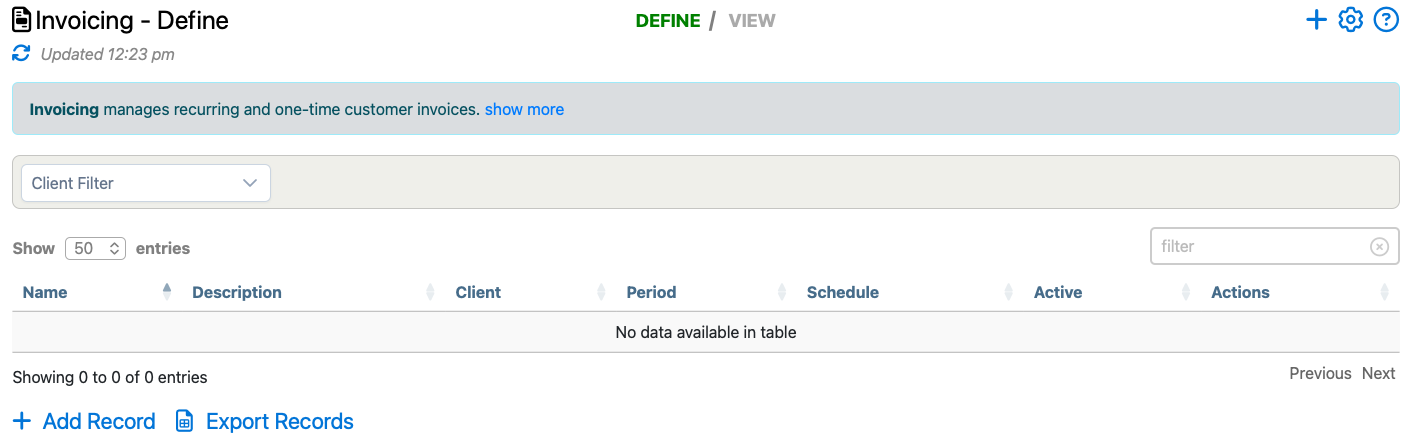
Define Invoice Rules
Use the Define view to manage invoice definitions. Each definition controls who the invoice is for, how often it should run, when it runs, and which delivery or accounting options apply.
The invoice list can show the invoice name, description, client, invoice period, schedule mode, active status, and row actions. The client filter helps narrow the list when a company has many invoice definitions.
Create Or Edit An Invoice
Use Add Record to create a new invoice definition. Existing invoice definitions can be edited from the row actions.
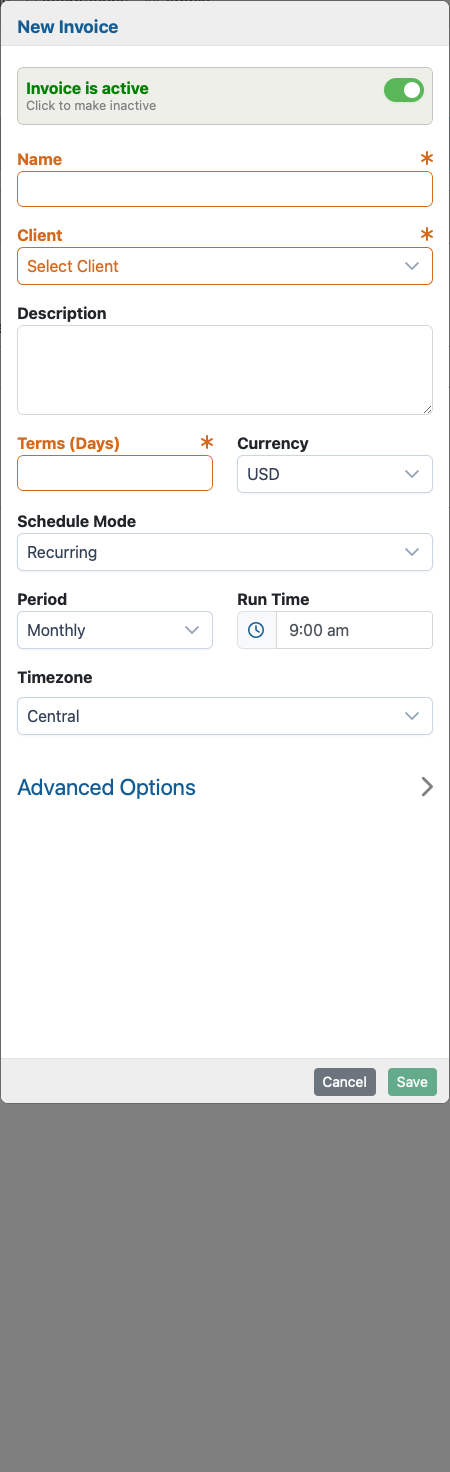
The invoice form includes the core setup fields for the invoice definition:
- Name: the label administrators use to recognize the invoice definition.
- Client: the customer or client the invoice belongs to.
- Description: optional internal context for the invoice definition.
- Terms (Days): how many days after generation the invoice is due.
- Currency: the currency used for invoice totals.
- Schedule Mode: whether the invoice is recurring, manual, or one-time.
- Period: the invoice period, such as daily, weekly, monthly, quarterly, yearly, or custom.
- Run Time: the time of day the invoice should run when scheduled.
- Timezone: the timezone used when calculating run time and invoice periods.
When the period is set to Custom, the form also asks for custom start and end dates.
Advanced Options
The Advanced Options section controls delivery and accounting behavior. Depending on company setup, administrators may see options to send generated invoices by email, mark invoices for QuickBooks processing, or queue postal delivery.
If email delivery is enabled, add the recipient email addresses that should receive generated invoices.
Preview Or Run An Invoice
Invoice row actions can be used to preview or run an invoice for the current period or previous period. Preview opens a temporary PDF so the invoice can be checked before it is recorded. Run creates a persisted invoice record.
After a successful run, Telephone Timesheets switches to the invoice history view so administrators can review the generated invoice record.
Review Generated Invoice History
The View tab shows generated invoice records. The history table can include invoice number, total, due date, payment status, invoice status, QuickBooks status, postal status, period start, period end, and row actions.
The date control can narrow the history view to a specific day. Row actions can open the invoice PDF, download it, delete a generated record when allowed, or open the audit history.
Payment And Delivery Status
Generated invoices can move through statuses such as generated, sent, failed, delivery failed, or deleted. Payment status is updated from recorded payment events, which can be reviewed on the Payments page.